Reactive Memory Management Is Not Enough for Modern Browsers
A systems perspective on Chromium's memory architecture, the limits of reactive
optimization, and the case for predictive orchestration.
I. The Observation
The Developer's Daily Reality
During long development sessions, Chrome often consumes several gigabytes of memory even when only a few
tabs are actively used. A typical workflow—a code editor in one tab, documentation in another, a
localhost preview, a database GUI, and a handful of Stack Overflow pages—can push a browser well past 4
GB of RAM consumption.
Most users assume this is simply poor optimization. The common refrain is: "Chrome is a memory hog." But
this assumption is architecturally uninformed. The issue is more structural than accidental. Modern
Chromium-based browsers intentionally isolate tabs into separate renderer processes for
security and stability. The result is a browser that is safer and more resilient—but also significantly
more memory-intensive.
The Question Nobody Asks
The real question is not "why does Chrome use so much RAM?" The real question is: why does Chrome
wait until memory is critically low before doing anything about it?
II. Chromium's Multi-Process Architecture
The Process Model
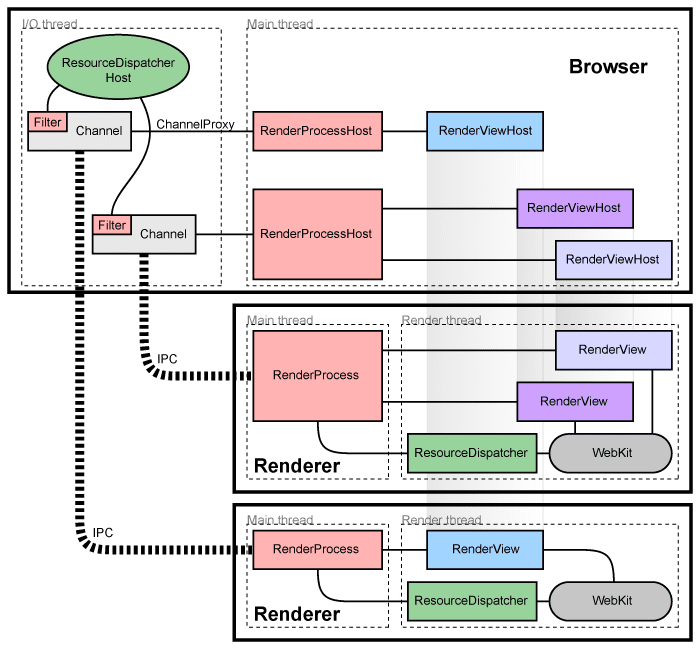
Chromium does not run as a single monolithic application. It decomposes the browser into multiple
isolated processes, each with its own memory space. This is not a bug—it is a deliberate design decision
rooted in security and fault tolerance.
Simplified Process Breakdown
Browser Process
UI, navigation, storage, network
GPU Process
Compositing, WebGL, video decode
Renderer Process 1
Site A (tab 1, tab 4)
Renderer Process 2
Site B (tab 2)
Renderer Process 3
Site C (tab 3, tab 5)
Utility Processes
Extensions, plugins, service workers
Each renderer process is sandboxed. A crash in one tab cannot affect another.
This is the security model that makes Chrome resilient—and memory-heavy.
Site Isolation
Since 2018, Chromium enforces Site Isolation—a direct response to the Spectre and
Meltdown CPU vulnerabilities. Every unique site (defined by scheme + eTLD+1) gets its own renderer
process. This means github.com and stackoverflow.com will always run in
separate processes, even if opened in adjacent tabs.
The security benefit is clear: a malicious page cannot read the memory of another site's process. The
memory cost is equally clear: each renderer process carries a baseline overhead of approximately
30-50 MB, regardless of content complexity. Ten tabs from ten different sites means ten
separate renderer processes, and 300-500 MB of baseline overhead before any actual page content is
loaded.
The Sandbox Tax
Each renderer process operates within a restrictive sandbox. It cannot access the filesystem, the
network, or the GPU directly. All communication flows through IPC (Inter-Process Communication) channels
to the browser process. This isolation is essential for security but introduces duplication: shared
libraries, V8 engine instances, and font caches are loaded independently into each process's address
space.
III. The Reactive Toolbox (What Chrome Already Does)
Tab Discarding
When system memory pressure reaches a critical threshold, Chrome can discard background
tabs. A discarded tab's renderer process is killed entirely, freeing all associated memory. The tab
remains in the tab strip, but its content must be fully reloaded when the user returns to it.
This is effective but destructive. Any unsaved form state, scroll position, JavaScript runtime context,
and in-memory application state are lost. For web applications like Google Docs or Figma, this means a
full reload cycle that can take several seconds.
Tab Freezing
A lighter alternative to discarding. Frozen tabs retain their renderer process and DOM tree in memory but
halt all JavaScript execution, timers, and network requests. The Page Lifecycle API (freeze
and resume events) allows web pages to respond to this transition.
The limitation: a frozen tab still occupies its full memory footprint. Freezing saves CPU cycles, not
RAM.
Memory Saver Mode
Introduced in Chrome 108, Memory Saver automatically deactivates tabs that have been inactive for a
configurable period. Internally, this is a user-facing wrapper around the tab discarding mechanism with
configurable exceptions.
Back/Forward Cache (BFCache)
BFCache stores complete page snapshots in memory for instant back/forward navigation. While this
dramatically improves perceived performance, it trades memory for speed—exactly the opposite of memory
optimization. A cached page can consume 50-100 MB of RAM while the user has already navigated away from
it.
The Central Problem
Every optimization listed above is reactive. The browser waits for memory pressure
to occur, then responds. Tab discard triggers when RAM is critically low. Memory Saver activates
after a fixed timeout. Freezing happens based on visibility state, not predicted usage. None of
these systems attempt to understand what the user will do next.
IV. The Core Question
Why Wait?
The fundamental question is architectural:
"Why does the browser wait for memory pressure before acting? Can browsers predict inactive workloads
earlier—and optimize proactively instead of reactively?"
Consider a typical browsing session. A developer opens 30 tabs during a research phase. Within 20
minutes, their active working set narrows to 4-5 tabs. The remaining 25 tabs sit idle, consuming memory,
but Chrome's optimization mechanisms won't engage for potentially hours—or until the system is already
under pressure.
A human observer could predict this narrowing within minutes. The browser cannot, because it is not
designed to.
V. Toward Predictive Memory Orchestration
The Concept
Predictive memory orchestration is the idea that a browser could observe user behavior patterns and
proactively reorganize memory allocation before pressure occurs. This is not about replacing
Chrome's existing scheduling or process management. It is about augmenting existing
heuristics with behavioral signals.
Revisit Probability
Not all background tabs are equal. A tab containing active documentation that a developer references
every 3 minutes has a high revisit probability. A tab opened from a search result 40 minutes ago, never
scrolled, has a near-zero revisit probability. A predictive system could assign each background tab a
revisit probability score based on:
- Recency: How recently was the tab last focused?
- Frequency: How often has the user switched to this tab?
- Session context: Is this tab part of the current working set or a remnant from a
previous task?
- Content type: Documentation tabs have different revisit patterns than social media
tabs.
Workload Classification
Tabs could be classified into workload categories:
| Category |
Example |
Memory Strategy |
| Active |
Currently focused tab |
Full allocation |
| Hot Standby |
Docs referenced every few minutes |
Full allocation, priority retention |
| Warm |
Recently used, may return |
Partial compression, lazy restore |
| Cold |
Opened 30+ min ago, no interaction |
Aggressive compression or discard |
| Dormant |
Not visited in current session |
Serialize to disk, free process |
The key distinction: this classification would be continuous and adaptive, not based on
fixed timeouts. A tab's category would shift dynamically based on observed behavior, not arbitrary
thresholds.
VI. The Hard Problems (Why This Isn't Simple)
Any credible discussion of predictive orchestration must acknowledge why it does not yet exist. The
challenges are significant:
JavaScript Runtime State
A V8 isolate (JavaScript runtime) contains heap objects, closures, compiled bytecode, and optimized
machine code. Compressing or serializing this state without breaking the runtime is extraordinarily
complex. A tab running a complex web application is not just "a webpage"—it is a running program with
mutable state.
WebSocket Persistence
Tabs with active WebSocket connections (chat applications, real-time dashboards, collaborative editors)
cannot be freely frozen or discarded without severing the connection. Reconnection is not always
seamless—some protocols require full re-authentication or state synchronization.
Wake Latency
If a "cold" tab is aggressively compressed and the user switches to it, the restoration latency becomes
the user experience. A 500ms delay feels instant. A 3-second delay feels broken. If predictive
orchestration causes more noticeable delays than the current reactive system, it
fails—regardless of how much memory it saves.
GPU Context Restoration
Tabs using WebGL, Canvas 2D, or hardware-accelerated CSS animations maintain GPU state. Discarding and
restoring GPU contexts is expensive and can cause visual glitches. Games, 3D visualizations, and
graphics-intensive applications are particularly sensitive.
Prediction Mistakes
Any predictive system will make errors. If the browser aggressively compresses a tab the user returns to
10 seconds later, the user experiences a worse outcome than no prediction at all. The system must be
conservative by default—the cost of a false positive (unnecessary compression) is much
higher than the cost of a false negative (missing an optimization opportunity).
CPU Overhead
The prediction system itself consumes computational resources. If the CPU cycles spent on behavioral
modeling exceed the memory savings, the system is a net negative. This is the fundamental engineering
tradeoff: the predictor must be cheaper than the problem it solves.
VII. A Possible Experimental Design
If one were to test this hypothesis rigorously, the experimental approach might look like this:
Phase 1: Data Collection
Instrument a Chromium build to log tab lifecycle events: focus, blur, navigation, scroll, click, and
discard events with timestamps. Collect anonymized traces across diverse browsing sessions—development
workflows, research sessions, casual browsing, and media consumption.
Phase 2: Pattern Analysis
Cluster browsing sessions by behavior type. Identify common patterns: the "research burst" (many tabs
opened, few revisited), the "working set" (stable rotation among 3-5 tabs), the "accumulator" (tabs
opened and never closed).
Phase 3: Revisit Predictor
Build a lightweight classifier that predicts, for each background tab, the probability of revisit within
the next N minutes. The model must be small enough to run within the browser process without measurable
overhead—likely a simple decision tree or logistic regression, not a deep neural network.
Phase 4: Simulation
Using collected traces, simulate proactive compression and discard policies driven by the predictor.
Measure: total memory saved, number of false positives (premature discards), and estimated wake latency
impact. Compare against Chrome's current reactive policies under identical workloads.
This is systems research, not product engineering. The goal is to determine whether predictive
orchestration is feasible and beneficial under real-world constraints—not to ship a
feature.
Final Conclusion
Predictive orchestration may ultimately prove too computationally expensive for practical deployment. It
is also possible that simpler heuristics outperform learning-based systems under real-world workloads.
The engineering constraints—JavaScript runtime serialization, WebSocket persistence, GPU context
management, and the fundamental cost of prediction errors—are substantial.
However, as browsers increasingly become operating-system-like runtime environments—hosting IDEs, design
tools, communication platforms, and entire development workflows—static memory policies may become
insufficient for increasingly complex multi-tab workloads.
The interesting question is no longer whether browsers should optimize memory usage, but whether
they can understand workload behavior well enough to optimize proactively instead of
reactively.
That is the research question worth pursuing.